Find, fix and monitor accessibility issues in WordPress.
Scan your WordPress site against 60 WCAG checks, fix what is broken, and give every visitor a menu to adapt the page in one click. Everything runs inside WordPress, on your own server.
Free for one site · Works with any theme · No cookies
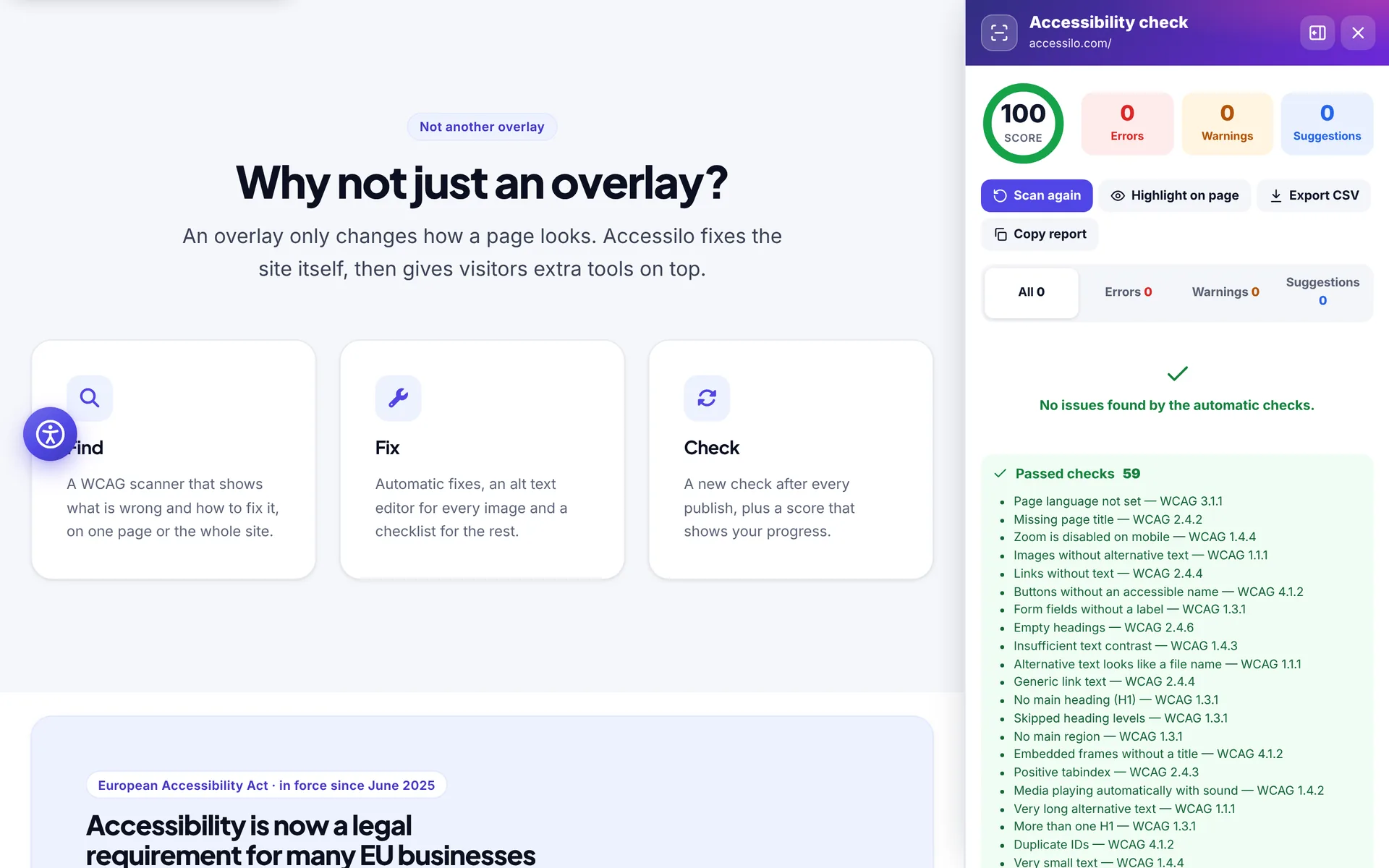
A real screenshot: Accessilo checking its own website. Score 100, no issues, 59 checks passed.
Why not just an overlay?
An overlay only changes how a page looks. Accessilo fixes the site itself, then gives visitors extra tools on top.
Find
A WCAG scanner that shows what is wrong and how to fix it, on one page or the whole site.
Fix
Automatic fixes, an alt text editor for every image and a checklist for the rest.
Check
A new check after every publish, plus a score that shows your progress.
Accessibility is now a legal requirement for many EU businesses
Online shops, banks, transport and telecom services selling to EU consumers must now offer accessible websites and apps. Accessilo is the fastest way to start: better experience for visitors today, a clear list of what to improve tomorrow.
Find the problems before your visitors do
Click “Accessibility check” on any page, or scan the whole site from the admin. You see exactly where each issue is and how to fix it.
Explore the scanner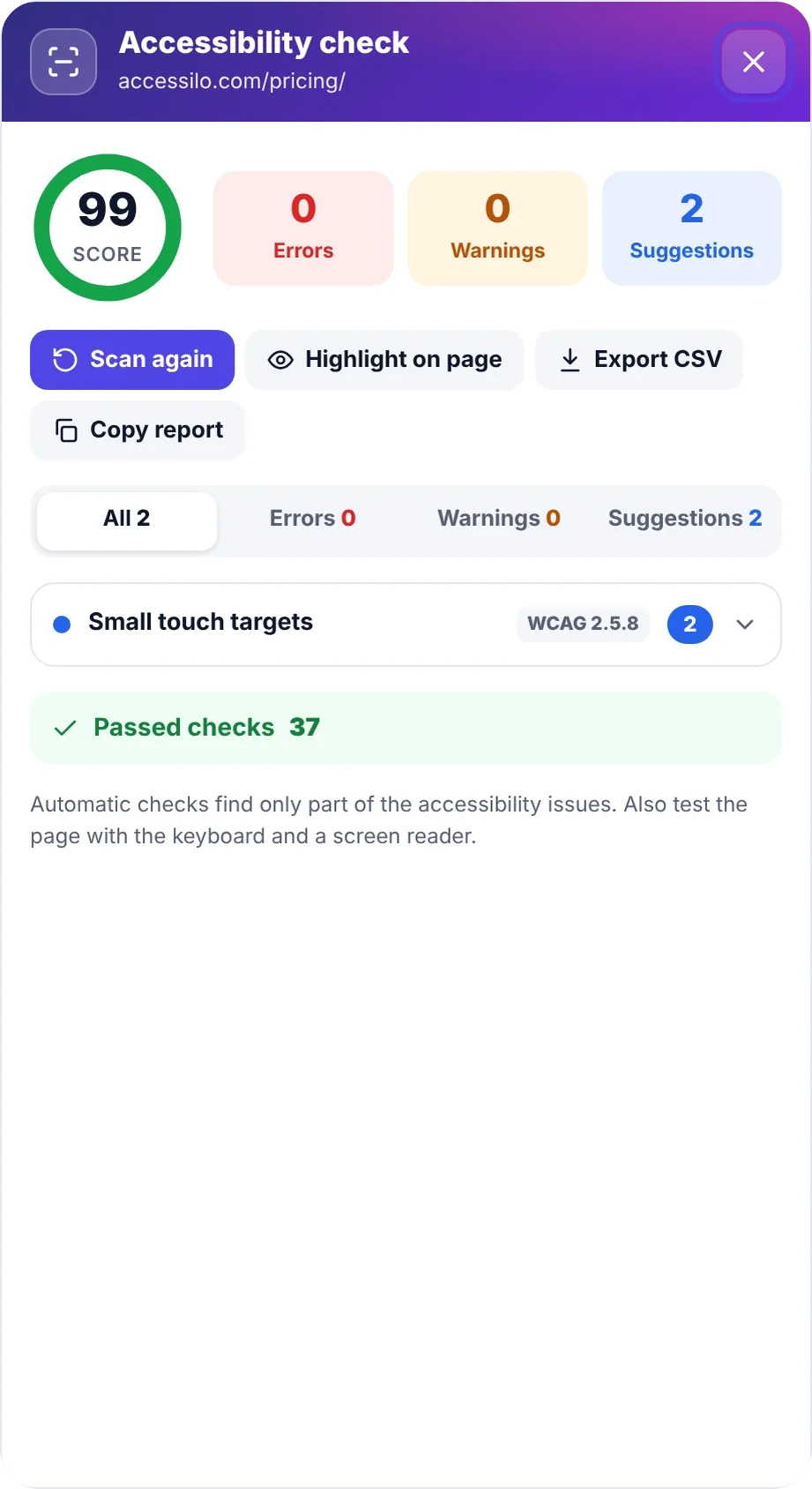
One click, and the page fits the person
Visitors pick a profile that fits them (low vision, dyslexia, ADHD, epilepsy and more) or fine-tune any of 26 tools. Their choice is remembered.
Explore the visitor menu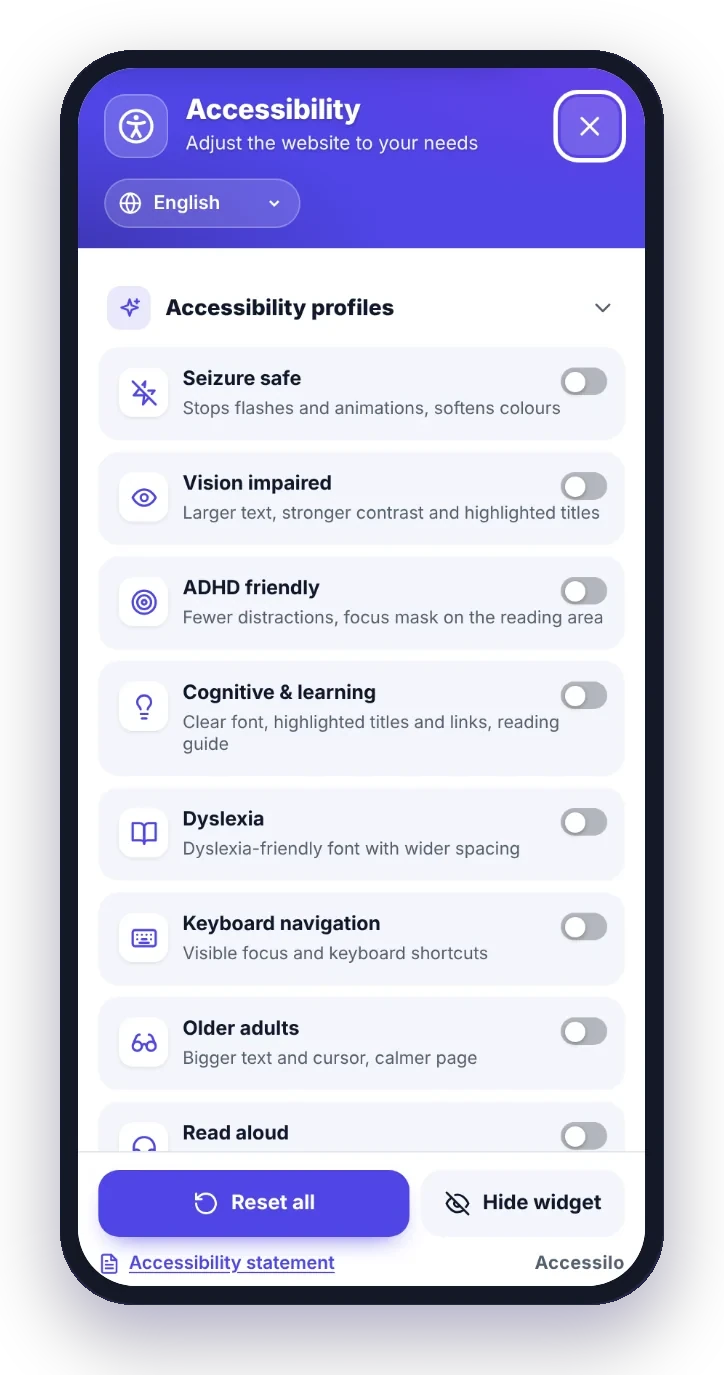
Set it up once, roll it out to every client
White label turns Accessilo into your own product, and settings travel between sites with export and import.
Explore white label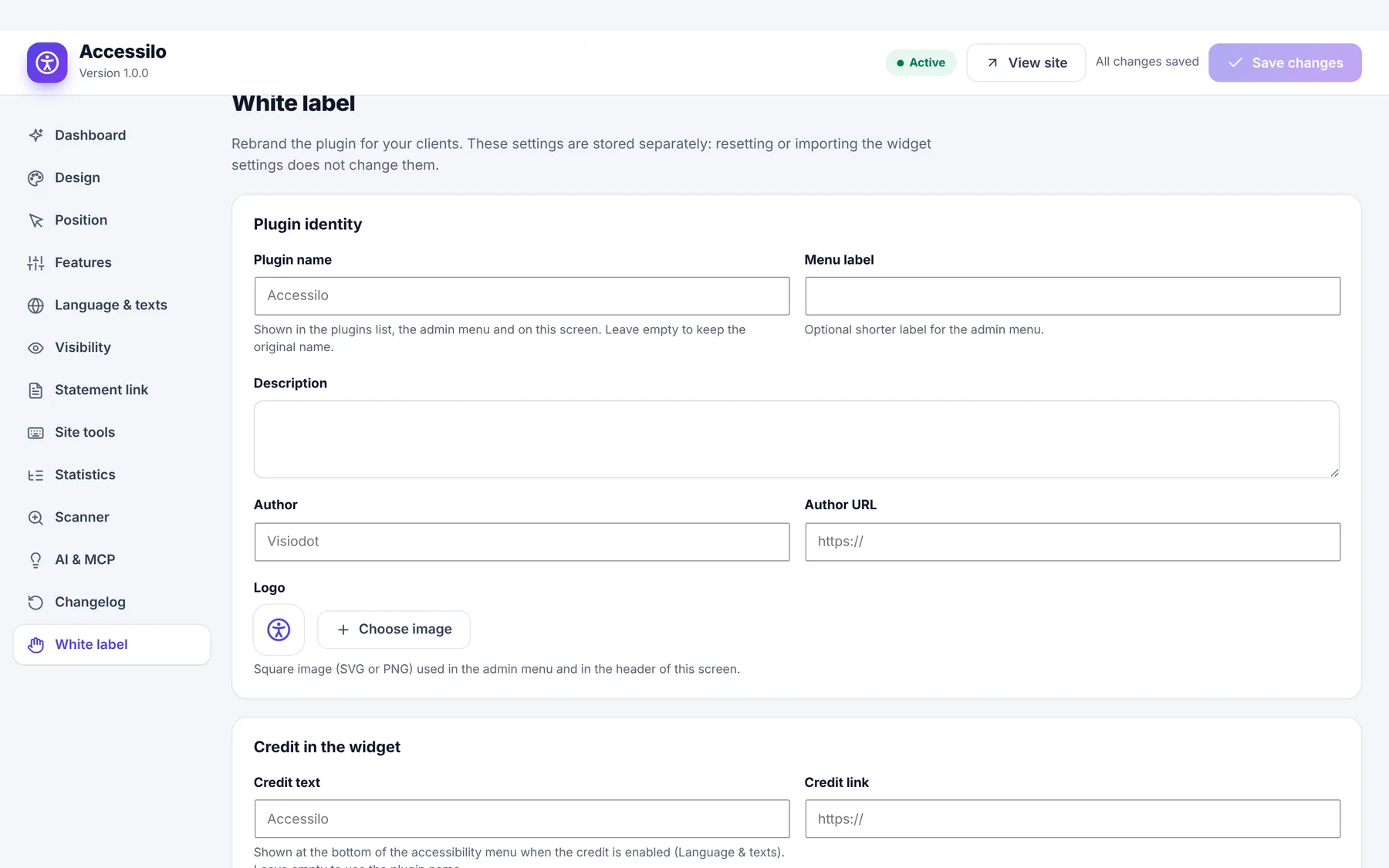
From install to accessible, in three steps
Accessilo does the work a plugin can do automatically and guides you through the rest, so you always know what to do next.
Help every visitor from day one
Activate Accessilo and your visitors can instantly adapt text, colours and navigation to their needs, while skip link, focus outline and new-tab warnings fix common barriers across the whole site.
Scan, fix and track progress
The WCAG scanner checks up to 1,000 pages per run and tells you exactly what to improve in your content and theme, with tips for each issue. Watch your score go up as you fix them.
Show your commitment
Link your accessibility statement right from the menu, so visitors and authorities can see how you take accessibility seriously and how to reach you.
Start free. Go Pro for every feature.
Free for one website. Pro from €29 a year, or pay once with a lifetime plan.
€0
One website. WCAG scanner, 3 colour themes and 15 visitor tools. Free account for automatic updates.
Get it freeFrom €29 a year
All 26 tools and 8 profiles, every automatic fix, scheduled scans and email support. White label on Agency plans. Or pay once: lifetime from €79.
Black Friday offer: 40% off with BLACKFRIDAY40 until November 30See plans and pricingQuestions before you buy
Will Accessilo help my website meet WCAG and the European Accessibility Act?
Yes, and it’s the quickest way to get started. From the moment you activate it, visitors can adapt every page from the accessibility menu, and site-wide fixes such as a skip link and a visible focus outline remove common barriers automatically (Pro adds all 26 tools, 8 one-click profiles and 13 automatic fixes). The built-in scanner then checks your pages against 60 WCAG checks and shows you exactly what to improve in your content and theme, with how-to-fix tips for each issue. Add your accessibility statement to the menu and you have a clear, documented path towards WCAG 2.1 AA, the standard behind the EAA.
Is there a free version?
Yes. Accessilo Free costs nothing for one website: create a free account, download the plugin and activate your free license key to receive automatic updates. It includes the visitor menu with up to 15 tools, three ready-made colour themes, the skip link and focus outline, the scanner on any page and on up to 5 pages per dashboard scan, the checklist, alternative texts for 50 images and basic statistics.
Pro (Personal, Agency or Unlimited) unlocks all 26 tools and 8 profiles, full design control, all 13 automatic fixes, scans of up to 1,000 pages with monitoring, unlimited alt texts, detailed statistics and AI agents. Compare Free and Pro.
How is Accessilo different from an accessibility overlay?
An overlay is a widget that sits on top of the page. Accessilo has a visitor menu too, but most of the plugin works on the site itself: a WCAG scanner with 60 checks, automatic fixes for common barriers, an Alt texts tab to describe every image, a checklist for the manual steps and a new check after every edit.
No plugin can make a website compliant on its own: Accessilo does what can be done automatically and shows you exactly what to fix by hand.
Who has to comply with the European Accessibility Act?
Since 28 June 2025 the EAA applies to many products and services sold to consumers in the EU, including online shops, banking services, transport ticketing, e-books and telecom services. Microenterprises providing services are exempt. Read our EAA overview to see whether it concerns you or your clients.
Does it use cookies or track my visitors?
No cookies and no personal data. A visitor’s preferences are stored only in their own browser, so the site remembers them on the next visit. Usage statistics are optional, anonymous daily counters: no IP addresses, no profiles, nothing sent to third parties.
Will it slow down my site or clash with my theme?
The widget is a single lightweight script that loads from your own server, with no external services or SaaS account. Its menu runs inside an isolated shadow DOM, so your theme’s styles can’t break it and it doesn’t break your theme. It works with any theme or page builder because the plugin adds it to every page automatically.
Which languages does it speak?
Eight: English, Italian, German, French, Spanish, Portuguese, Dutch and Polish. The widget follows your site’s language automatically and visitors can switch language from the menu. The admin is translated into the same languages.
What's the difference between yearly and lifetime?
Yearly plans include updates and support for one year and renew automatically; you can cancel the renewal anytime from your account. Lifetime plans are a single payment: updates are included for the lifetime of the product, and email support for the first 12 months after purchase, as defined in our Terms of sale. The plugin keeps working on your sites in any case.
Can I use it on my clients' websites?
Yes. The Agency plan covers 10 websites and Unlimited covers as many as you manage. Both include white label: rename the plugin, use your own logo and author name, and show your own credit in the widget. It’s a great way to add accessibility to your maintenance plans. White label is not part of the Personal plan.
Where do I find my license key?
Right after checkout, and anytime in My account, where you can also manage your sites, download the plugin, get invoices and handle your subscription.
15-day money-back guarantee
Try Accessilo on your sites with zero risk. If it's not right for you, for any reason, write to us within 15 days of your purchase and we'll refund you in full. No questions asked. Read the refund policy.
Give your next WordPress site more than a widget
Install the plugin in two minutes: WCAG scanner, automatic fixes, alt texts, testing and a visitor menu, all in one.
Black Friday offer: 40% off with BLACKFRIDAY40
