
Check the page you’re on
- Log in as an administrator and open any page of your site.
- Click Accessibility check in the admin bar.
- Read the score and the list of errors, warnings and suggestions. Click an issue to see where it is and how to fix it; Highlight on page marks every element.
Scan many pages at once
In Accessilo → Scanner choose the content types and number of pages (up to 1,000 per run), include the home page if you want, and click Start scan. Each page is loaded invisibly with the same engine, including colour contrast, text size and touch targets.
Filter, search and group the results
After a scan the results open in one list. Switch between By page and By problem: the second view lists each problem once, with the pages that have it and a Show on page link. Use the search box and the severity buttons (Errors, Warnings, Suggestions), and open More filters to narrow down by content type, status, problem or WCAG criterion. Expand all opens every page at once.
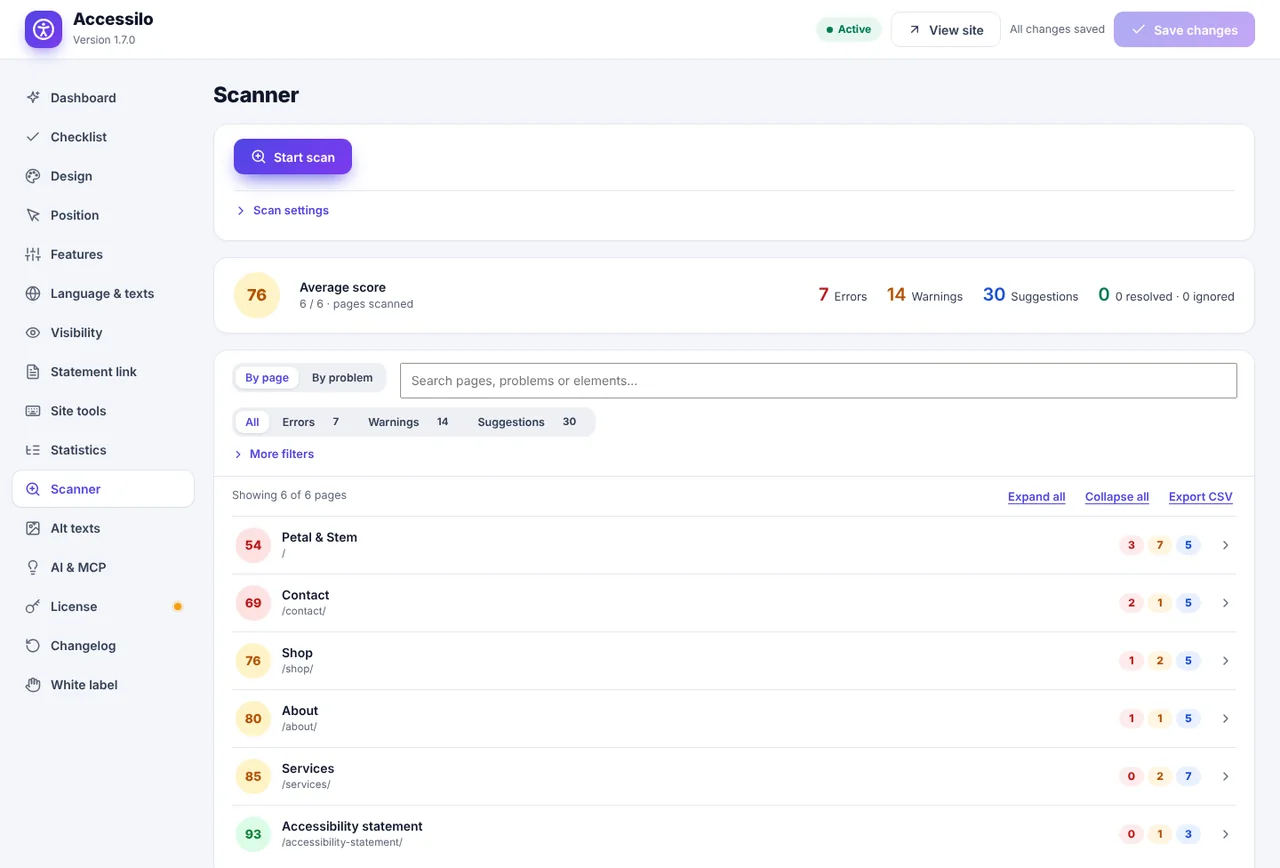
At the bottom of the Scanner screen, What the scanner checks lists all 60 checks with their severity, WCAG criterion and the result of your last scan. Missing alt texts are fixed faster in the Alt texts tab, and the checklist shows which steps your scan already covers.
What it checks
60 checks including colour contrast, alternative text, heading order, form labels, link text, empty links and headings, page language, zoom, touch-target size, ARIA roles and attributes, list structure, nested interactive elements, video captions and automatic refresh. Each issue shows its WCAG reference.
Resolved, ignored and progress
Open a page’s details to mark each problem as Resolved or Ignore it as a false positive, on that page or on all pages. Ignored problems no longer count in the score. A resolved problem that a later scan finds again comes back as Reappeared. The chart at the top of the Scanner screen shows your average score scan after scan.
Scan the whole site
Choose The whole site to check every published page of the selected content types (up to 1,000 per run). Accessilo shows the number of pages and an estimated time first. The scan runs in your browser tab, two pages at a time, so keep the tab open until it finishes and run big scans outside peak hours on shared hosting.
Export
Download a CSV (protected against spreadsheet formulas) or copy a report to send to a developer or client.
Pro tip: after fixing what the scanner reports, browse your key pages using only the keyboard. It takes five minutes and catches the rest.
